How to Design Multilingual Campaign Layouts Without Shrinking Every Headline
 Written by HiveGlyph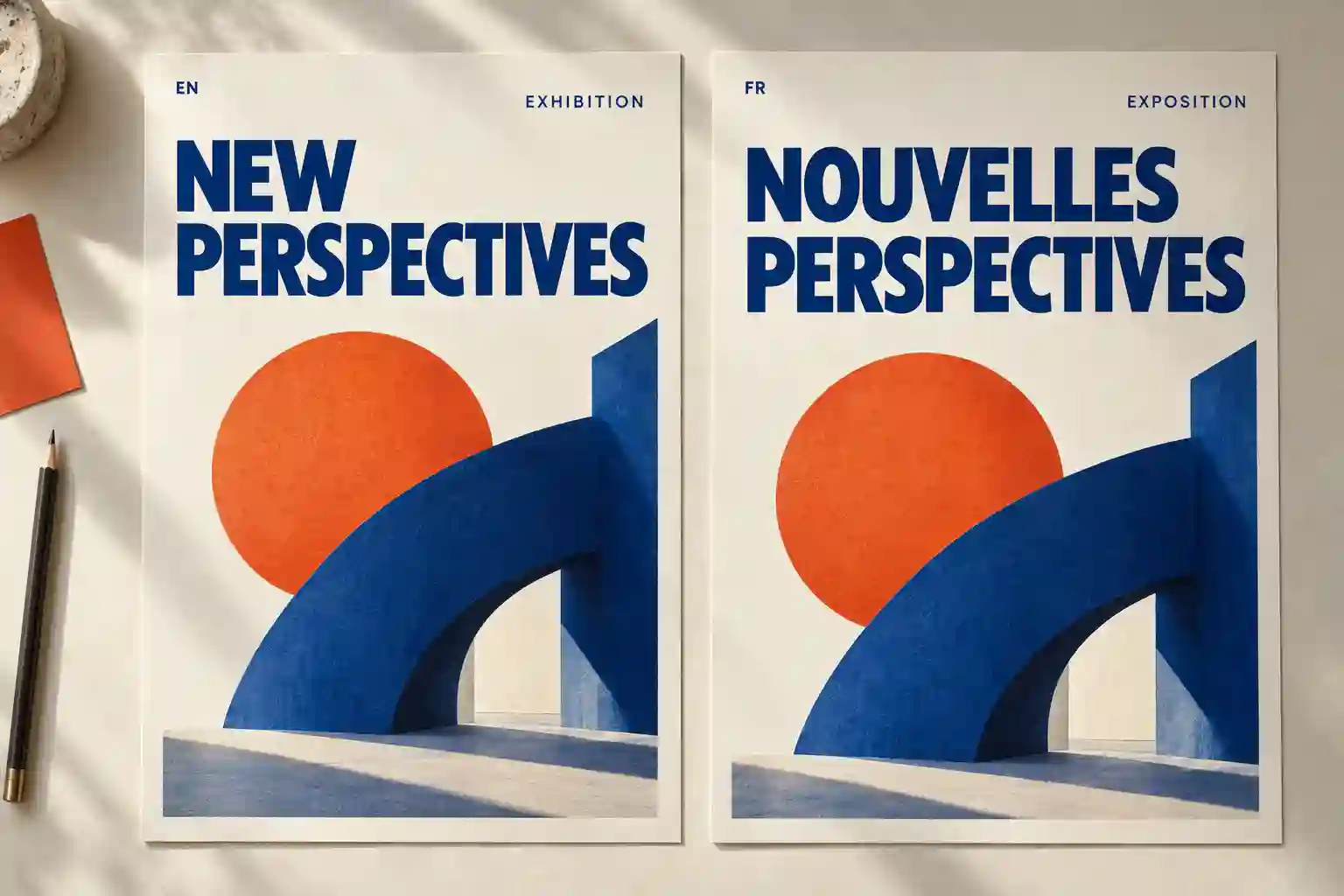
The English headline fits perfectly. The translated version pushes onto a third line, the booking details slide downward, and the carefully balanced poster starts to feel crowded.
Reducing the font size seems like a quick repair. Then the translated campaign looks quieter than the original, even though both versions are supposed to carry the same message.
Multilingual campaign layouts need room for different words, different letterforms, and different ways of organizing information. The useful starting point is deciding what the design must preserve and where it can adapt.
A designer raised this problem in a Graphic Design Stack Exchange question about translated text lengths. Their layout worked for most content, but some translated sections broke. They asked whether changing font sizes was a reasonable solution and what they could have planned earlier.
That is the production problem this guide addresses.
Find the parts of the campaign with the least room
Start with the smallest, most constrained pieces of text.
A paragraph may have space to gain another line. A price badge, narrow headline, or short call to action often has much less flexibility. These are the areas to examine before approving the first language.
The W3C guidance on text size in translation explains that translated text can occupy substantially different amounts of space. Short strings can be particularly troublesome, and character count alone cannot predict the width or height of the result. Its examples also show why one universal expansion percentage cannot describe every translation.
Create a short content inventory for the campaign. Include the headline, supporting message, action, dates, prices, and any wording that must remain exact.
For each item, ask what happens if it becomes longer. Can the frame grow? Can a line break move? Is another layout available? If the only answer is “make it smaller,” the design needs another option.
Separate brand consistency from identical geometry
A campaign can remain recognizable while its text blocks change shape.
Choose the relationships that matter most. Perhaps the headline must remain the strongest element, the product must stay visible, and the action must sit close to the offer. Those relationships can survive a different line count.
Other details may be flexible. A heading can move from two lines to three. Supporting copy can sit below the image in a narrow format. A decorative shape can become smaller when the message needs more space.
Write these decisions into the template rather than resolving them independently in every language.
For a hypothetical exhibition campaign, the rules might be:
- Keep the exhibition title visually dominant.
- Keep the date and venue together.
- Allow the title block to grow downward.
- Move the image to a separate band when the title needs more space.
- Preserve the agreed minimum size for practical information.
These are proposed design rules for an invented project. Their value is that they give the next designer a clear order of decisions.
Give translators the composition and the purpose
A spreadsheet containing isolated phrases leaves out much of the design problem.
Provide a reference layout and explain what each phrase does. Is it a headline meant to attract attention, a label identifying a product, or an instruction asking the reader to act? Note which terms are fixed and which wording can be adapted.
A character limit can communicate a constraint, but it should not become an excuse to approve awkward language. If the accurate wording does not fit, bring the translation and layout decisions together.
The W3C internationalization quick tips recommend keeping text on separate layers in graphics supplied for localization. They also recommend checking imagery and examples with people in the target market, since meaning extends beyond the written words.
For a campaign image, that might mean asking whether a gesture, visual joke, or seasonal reference still makes sense. Give the reviewer the full composition so they can see the message the audience will actually encounter.
Build a small test sheet before adapting every asset
Choose one demanding campaign format and place the available language versions side by side.
Use approved translations where possible. If they are not ready, longer placeholder wording can expose cramped frames, but label it as a layout test. It cannot establish whether the eventual translation reads naturally.
A useful test sheet includes more than the longest headline.
A longer headline
Inspect the line count, emphasis, and relationship to the image. Try expanding the title area or using an alternate composition before reducing the type.
A short translated headline
Look for an awkward gap or a composition that feels unexpectedly empty. Reposition the text block where needed without stretching the letters to fill the original width.
A long unbroken term
Check for overflow or an uncomfortable line break. Widen the frame where possible and request language-specific advice before splitting the word.
Dates, prices, and units
Keep related information together. A dedicated area for practical details can make these changes easier to manage across versions.
The smallest supporting copy
Inspect readability at the intended delivery size. If the text becomes difficult to read, increase its available space or simplify the decoration around it.
For the exhibition example, begin with the portrait poster. Then test the narrowest digital banner. A composition that works vertically may need a different arrangement when the available height becomes limited.
Record the specific failure. “The venue name collides with the date” is actionable. “The German version looks wrong” is too broad to guide the next revision.
Check the typeface with the actual translated text
A convincing English specimen does not establish how the font will handle every language in the campaign.
Paste the final wording into the intended application and inspect the whole string. Look for missing characters, unexpected substitutions, accent collisions, and changes in weight or spacing.
Review each style you intend to use. A headline test in Regular does not establish that the chosen Bold or Italic file will behave as expected.
Also consider the visual relationship between scripts. Matching the same numerical font size is only a starting point. Compare apparent prominence, paragraph texture, and the space around the text in the finished composition.
Our guide to choosing a font family or a single style helps define the recurring text roles before selecting the styles. For a multilingual project, add the actual language samples to that decision sheet.
If you cannot read a script, involve someone who can. A visually tidy arrangement can still contain an inappropriate break or a damaged word.
Repair the layout in a deliberate order
When the approved wording does not fit, work through the available space before changing the type.
First, remove accidental constraints. A text box may be narrower than the space beside it, or an oversized decorative element may be occupying the area the headline needs.
Next, try a different line arrangement. Review proposed breaks with the language reviewer instead of treating each word as an interchangeable shape.
Then consider an alternate composition. Moving the photograph below the headline may preserve both the image and a strong title. A campaign system can contain two approved arrangements without losing its identity.
Copy adaptation is another option when the brief allows it. Ask the translator or copy owner for a shorter version that preserves the intended offer and tone. Keep the approved original beside the revision so the change remains visible.
Finally, consider a measured type-size adjustment. There is no need to prohibit it completely. Judge the result at its intended viewing size and check that the information hierarchy still works.
Avoid compressing the letters horizontally simply to force a match with the original layout. If a genuinely narrower type style is being considered, evaluate it as a separate typographic choice.
Treat AI text fitting as a copy revision
Some design applications now place rewriting and translation tools directly beside the artwork.
Adobe’s Illustrator Rewrite documentation, updated on June 1, 2026, describes translation and a Fit Text option that shortens or expands wording. Adobe also notes that Rewrite does not use surrounding artwork as context when generating text, and translated text uses the default font for the selected language.
Those details matter during review. After applying a result, inspect both the wording and the font assignment.
For a hypothetical workshop advertisement, a shorter sentence might fit beautifully while losing an important qualifier such as “materials included.” Compare the revision with the approved message before accepting the improved fit.
Keep AI-generated alternatives in a review copy. Have the language reviewer confirm meaning and tone, then return to the layout check. A clean text box does not tell you whether the copy is ready.
Approve the exported artwork in its final context
Review the actual delivery files alongside the approved text.
For each language version, check the headline, offer, dates, names, and action. Confirm that the export contains the complete wording and that the correct version has been selected.
Inspect digital graphics at a realistic display size. Review print work with a physical proof appropriate to the project. Zooming into the source document is useful for detail, but it can hide how small supporting information feels in the finished piece.
Keep the editable master and the approved output clearly distinguished. Our editable design files guide covers the separate question of whether the recipient can make the promised changes after handoff.
Finish the approval record with the language, copy version, layout version, reviewer, and any remaining issue. If the artwork looks complete but language approval is pending, mark that plainly. The next person should know exactly which file is ready to use.